I needed a tool for a future project to send Hex data over a serial port, and I couldn't find anything that I liked the look of and filled my needs.
There was only one solution... Make my own tool for talking over the serial port!
From an undocumented project I learned about the web serial API that is built into chromium. This API is used for connecting to serial ports, to send and receive data. This can be used for anything from programming microbits and Arduinos, to distributing firmware to end users, all without having to download proprietary software. I found a few serial terminals that used the API, but they didn't make it easy to send large amounts of data (32768 Bytes).
The key requirement was to send hex data to devices, which is very useful for embedded development. I created a very basic UI for setting up the port settings
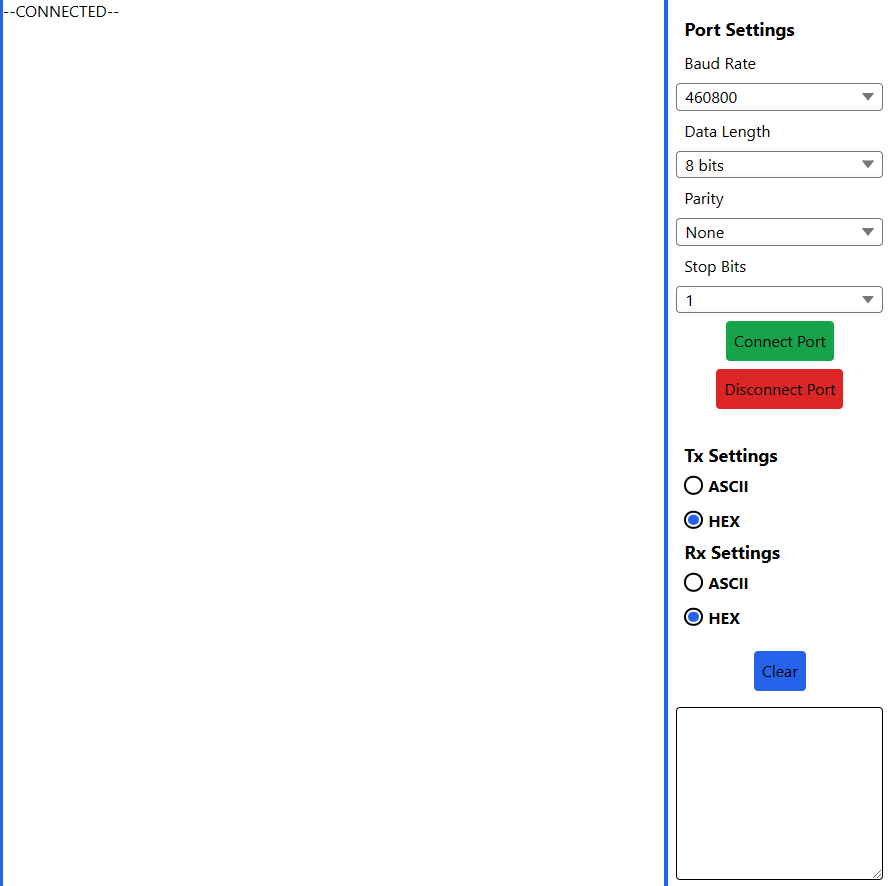 I had controls for all important serial port settings, along with the connect and disconnect buttons. Crucially the settings for changing the Tx and Rx mode, I kept these separate just in case. There is also a clear button to clear the terminal, and a big box for entering data.
Creating the tool myself, I wanted to be able to create "modules" that could be used to generate and send data, or control devices. I added a pane to the left for containing these scripts, even allowing the user to collapse the ones that they aren't using.

From the name of the modules you might be able to guess what the future project is.